The best smart water bottle for most people in 2026 is the HidrateSpark PRO 2, because it measures intake by weight and records sips more precisely than bottles that estimate from tilt or water level. Choose the LARQ PureVis 2 if purified water on the go matters more than precise tracking, the WaterH Boost if you want an on-bottle display at a lower price, and the HidrateSpark 3 if you just want glowing reminders on a budget. A smart bottle is only worth its premium if you will keep it charged and synced, so the details below focus on what each one is like to live with.
Our top picks
 Hidrate Spark PRO Smart Water Bottle
- Drinking enough water each day, and knowing how…
 Hidrate Spark PRO Lite Bundle Smart Water
- Drinking enough water each day, and knowing how…
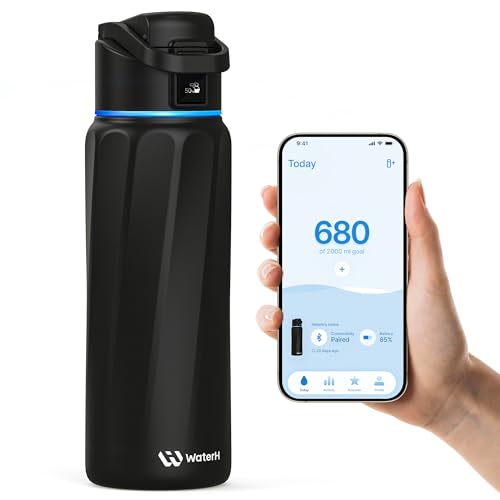 WaterH BOOST Smart Water Bottle Tracker with
- Given its combination of smart features, excellent insulation,…
- WaterH smart water bottle is a game-changer with…
- Stay cool with our leak-proof vacuum water bottle
| Product | Key specs | |
|---|---|---|
| Hidrate Spark PRO Smart Water Bottle | Drinking enough water each day, and knowing how… | Check price |
| Hidrate Spark PRO Lite Bundle Smart Water | Drinking enough water each day, and knowing how… | Check price |
| WaterH BOOST Smart Water Bottle Tracker with | Given its combination of smart features, excellent insulation,… WaterH smart water bottle is a game-changer with… Stay cool with our leak-proof vacuum water bottle | Check price |
 Hidrate Spark PRO Smart Tumbler Bundle | Drinking enough water each day, and knowing how… | Check price |
As an Amazon Associate we earn from qualifying purchases at no extra cost to you.
Updated November 2026 – specs and size notes rechecked against maker listings.
How Smart Bottles Track What You Drink
Tracking method is the biggest difference between models, and it determines whether your daily total is trustworthy.
| Method | How it works | Strengths | Weak spots |
|---|---|---|---|
| Weight sensor in base | Weighs the bottle after each sip and logs the difference | Most precise, captures every sip automatically | Sensor puck must be removed for washing and charging |
| Level sensor in cap | Reads water level when the bottle rests upright | Works with filtering and UV caps | Misses detail if you refill before it rests; estimates between readings |
| Sensor stick inside bottle | Measures water level from inside | Inexpensive, coin-cell powered | Stick sits in the water and needs careful cleaning |
| Reminder-only lid | Lights or vibrates on a schedule | No app or charging needed | Does not measure intake at all |
The Best Smart Water Bottles Compared
| Bottle | Capacity | Body | Tracking | Battery | Notable extras | Typical price range |
|---|---|---|---|---|---|---|
| HidrateSpark PRO 2 | About 30 oz tumbler size | Vacuum-insulated stainless steel | Weight sensor | USB-C, about 3 weeks per charge | Apple Find My, glow and sound reminders, Chug or Straw lid | $75 to $90 |
| HidrateSpark PRO (original, 32 oz) | 32 oz | Vacuum-insulated stainless steel | Weight sensor | Rechargeable | Larger size; may not fit most cup holders | $85 to $105 |
| LARQ PureVis 2 | About 19 to 25 oz depending on size | Vacuum-insulated stainless steel | Cap level sensor | Rechargeable, about a month | UV-C self-cleaning cap, optional filter straw | $120 to $140, plus filters |
| WaterH Boost | About 20 to 32 oz depending on model | Stainless steel or Tritan options | Lid sensor | Rechargeable | Lid LED indicators and reminders | $40 to $60 |
| HidrateSpark 3 | 20 oz | BPA-free plastic | Sensor stick | Coin cells, replaced every few months | Glow reminders, rubber grip | $40 to $50 |
Which One Fits Your Routine
Best overall: HidrateSpark PRO 2
The PRO 2 refines HidrateSpark’s earlier PRO with USB-C charging, Apple Find My support for locating a misplaced bottle, and sound alerts in addition to the glowing base. Because the base sensor weighs the bottle, the app logs intake without manual entry and syncs to Apple Health and Fitbit. Larger sizes mean fewer refills but may not fit car cup holders, so check the diameter first. Remember to take the sensor puck off before washing the bottle, since the electronics are not waterproof.
Best for clean water while traveling: LARQ PureVis 2
LARQ’s cap uses UV-C light to help keep the water and bottle interior fresh, and an optional filter straw reduces common tap-water contaminants such as chlorine taste and sediment. Its tracking reads water level when the bottle rests, which is less granular than weighing. Budget for replacement filters, typically about $20 to $25 each, every couple of months with daily use. Note that UV-C treatment is not a substitute for proper water treatment when traveling where tap water is unsafe; follow local guidance.
Best on-bottle display: WaterH Boost
The Boost uses lid indicator lights and reminders so you can check your day at a glance without opening an app. It costs noticeably less than the HidrateSpark PRO 2, with less polished tracking and app support.
Best budget reminder bottle: HidrateSpark 3
The HidrateSpark 3 is the simplest way into smart hydration: a plastic bottle, a glowing sensor stick and replaceable coin cells with no charging routine. It is lighter than steel models but does not keep water cold.
More Smart Water Bottles Worth Considering
The four picks above cover most shoppers, but each of these fills a specific gap, from precise weight-based tracking to the lowest entry price. Specs below come from the maker listings, so confirm size and color on the current page before buying.
Hidrate Spark PRO 2 30oz Tumbler – Best for Precise Tracking
This is the current-generation HidrateSpark tumbler and the model that the overall pick above refers to. It keeps the weight-based sensor in the base, which is why it records individual sips more reliably than level-reading caps, and it adds a longer battery life than the earlier PRO line. It suits desk workers and anyone who syncs hydration to a health app.
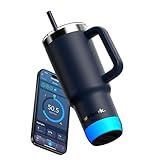
- 30 oz tumbler size
- Weight-based sensor in the base for sip-by-sip tracking
- Extended battery life, USB-C charging
- Glow and sound reminders through the companion app
- Pro: Most precise tracking in this guide.
- Pro: Long battery life means fewer charging chores.
- Pro: Syncs to common health apps.
- Con: The sensor base is not waterproof and must be removed for washing.
- Con: Large tumbler may not fit every cup holder.
Skip it if you want a bottle you can put straight into the dishwasher.
LARQ PureVis 2 Smart UV Self-Cleaning Insulated Water Bottle with Filter Straw – Best for Clean-Water Travel
The LARQ PureVis 2 is the pick for people who care more about water quality than about tracking detail. A UV-C cap helps keep the bottle interior fresh, and the filter straw handles common taste and sediment problems from tap water. It is the most expensive bottle in this guide.
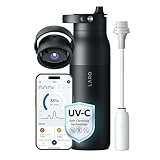
- UV-C self-cleaning cap
- Insulated stainless steel body
- Filter straw option for taste and sediment
- Rechargeable, about a month per charge
- Pro: Self-cleaning cap reduces the odor problem of long-term bottle use.
- Pro: Strong insulation for cold water.
- Pro: Long battery between charges.
- Con: Premium price plus ongoing filter costs.
- Con: Tracking is less granular than weight-based models.
Skip it if intake accuracy is the main reason you want a smart bottle.
Hidrate Spark 3 Smart Water Bottle – Best Budget Reminder Bottle
The Hidrate Spark 3 is the easiest way into smart hydration. It monitors intake with a sensor stick, lights up to remind you to drink and has no charging routine, because the stick runs on replaceable coin cells.

- Sensor stick tracks water level inside the bottle
- Glow reminders and app syncing
- BPA-free plastic body
- Coin cell batteries instead of USB charging
- Pro: Lowest price for real app tracking.
- Pro: No charging to remember.
- Pro: Light, easy to carry.
- Con: Plastic does not keep water cold.
- Con: The sensor stick needs careful cleaning and sits in the water.
Skip it if you want an insulated steel bottle.
HANDYSPRING Smart Water Bottle with Reminder – Best Rechargeable Budget Option
HANDYSPRING sells a lower-cost rechargeable bottle with lights and sound reminders and an intake tracker. It fits people who want charge-and-go convenience without paying for a premium brand.

- Light and sound drink reminders
- Water intake tracker
- Rechargeable battery
- Typically priced under $50
- Pro: Rechargeable at a low price.
- Pro: Sound plus light reminders suit noisy desks.
- Con: Smaller app ecosystem than HidrateSpark.
- Con: Health-app syncing is less proven.
Skip it if you need Apple Health or Fitbit syncing to work reliably.
MySofuTech Smart Water Bottle with LED Hydration Reminder and Temperature Display – Best for a Visible Temperature Readout
This bottle puts a reminder alarm and a temperature display on the lid, along with colored LED lights around the cap. It works for people who want to see water temperature at a glance and do not mind a lesser-known brand.

- LED hydration reminder and alarm
- Temperature display on the lid
- RGB LED lights around the cap
- Typically priced under $50
- Pro: Temperature readout without opening an app.
- Pro: Low price.
- Con: Unknown long-term support compared with established brands.
- Con: Limited third-party app syncing.
Skip it if long-term warranty and app support matter to you.
ULLA Smart Hydration Reminder – Best Add-On for a Bottle You Already Own
The ULLA is not a bottle at all, but a small light that fits on most existing bottles and glows when it is time to drink. It is a good low-cost test of whether reminders help you before buying a full smart bottle.

- Light-up reminder that fits most bottles
- No app required for basic reminders
- Typically priced under $50
- Pro: Works with the bottle you already like.
- Pro: Lowest cost way to try reminders.
- Con: No weight-based tracking.
- Con: Fit depends on your bottle’s shape.
Skip it if you want actual intake data in an app.
THERMOS Hydration Bottle with Meter – Best Non-Electronic Alternative
The Thermos hydration bottle has a built-in meter you rotate to track how many times you have refilled, with no battery or app at all. It costs a fraction of any smart bottle and is a reasonable pick if all you need is a visual goal.

- Built-in manual meter
- BPA-free material
- No battery, no app
- Pro: No charging or syncing.
- Pro: Very low cost.
- Con: Tracking is manual, so you can forget to update it.
- Con: No reminders.
Skip it if you want automatic tracking.
Decision Matrix
| Your priority | Best pick |
|---|---|
| Accurate daily totals synced to a health app | HidrateSpark PRO 2 |
| Fewer refills at a desk or gym | HidrateSpark PRO (32 oz) |
| Hotels, airports and gym fountains | LARQ PureVis 2 |
| See progress without a phone | WaterH Boost |
| Lowest cost, no charging | HidrateSpark 3 |
How We Chose These Smart Water Bottles
We did not run our own product tests. This guide compares maker specifications, published documentation, app store feature lists and recurring owner feedback. We weighted four things: how the bottle measures intake, how long the battery lasts, how easy the electronics are to clean and what the bottle costs to own after the purchase. Prices are shown as ranges because they move often.
Best Smart Water Bottle by Budget and Use
| Need | Pick | Key specs |
|---|---|---|
| Best smart water bottle overall | Hidrate Spark PRO 2 | Weight sensor · USB-C · health app sync · about 3 weeks per charge |
| Best for clean water | LARQ PureVis 2 | UV-C cap · insulated steel · filter straw option · about a month per charge |
| Best on-lid indicators | WaterH Boost | Insulated steel · lid indicators · rechargeable |
| Best under $50, no charging | Hidrate Spark 3 | Sensor stick · coin cells · plastic body |
| Best under $50, rechargeable | HANDYSPRING | Light and sound reminders · rechargeable |
| Best add-on | ULLA reminder | Glows on a schedule · fits most bottles |
| Best without electronics | THERMOS bottle with meter | Manual meter · no battery |
The three names to remember are the Hidrate Spark PRO 2 for accuracy, the LARQ PureVis 2 for clean water and the WaterH Boost for value.
Best Smart Water Bottle for Tracking Accuracy
The best smart water bottle for tracking accuracy is one with a weight sensor in the base, because it logs each sip rather than guessing from water level. Hidrate Spark PRO 2 and the original Hidrate Spark PRO both use this approach. Level-reading caps and sensor sticks can miss detail if you refill before the bottle sits still, so they suit casual tracking better than precise logging. If a health app is the goal, check that the bottle’s app lists your platform before you buy.
Smart Water Bottle Features That Matter
Battery Type and Charging
Rechargeable bottles use USB-C or a magnetic puck, with real-world battery life ranging from about two weeks to a month depending on the model. Coin-cell bottles such as the Hidrate Spark 3 avoid charging but need new cells every few months. Pick based on which chore you are more likely to remember.
Insulation and Materials
Vacuum-insulated stainless steel keeps cold drinks cold for hours, while plastic bottles are lighter and cheaper but do not insulate. If you want hot drinks in the bottle, read the maker’s guidance first, since electronics and seals may not tolerate heat.
Cleaning and Water Resistance
Most sensor bases, caps and sticks are not dishwasher safe. Wash the bottle body by hand and keep electronic parts dry. A bottle that is hard to clean tends to end up unused, so favor designs with a removable sensor.
App Quality and Health Syncing
An app that crashes or fails to sync turns a smart bottle into a plain one. Look at the app store rating, the update date and whether the app connects to Apple Health, Fitbit or Garmin before you commit.
Smart Water Bottle Mistakes to Avoid
Do not buy a bottle based on tracking features if you will not keep it charged. Do not assume a UV cap makes unsafe water drinkable. Do not set daily goals from the app without checking with a doctor if you have a condition that affects fluid intake. And do not pay for filters you will not replace, since an old filter loses its benefit.
Ownership Realities
- Charging is the real test. A smart bottle that dies becomes an ordinary bottle. Bottles that run three to four weeks per charge are far easier to keep going than ones that need weekly charging.
- Hand wash the smart parts. Sensors, caps and pucks are not dishwasher safe. The steel body of most models can be hand washed with a bottle brush; check each maker’s guidance before putting anything in a dishwasher.
- Refill habits affect accuracy. Set the bottle down for a moment after drinking and before refilling so the sensor can register the change.
- Calibrate your goal sensibly. Apps set daily targets from body weight and activity. These are general wellness estimates, not medical advice. Anyone with a heart, kidney or other condition that affects fluid intake should follow a doctor’s guidance instead of an app target.
- Consider the cost per year. A $80 bottle used daily for three years works out to about 7 cents a day. Add filter replacements for the LARQ, which can roughly double its yearly cost.
Which Smart Water Bottle Fits Your Situation
For a Desk Job
If you sit at a desk most of the day, a weight-sensor bottle such as the Hidrate Spark PRO 2 is the strongest fit, because you can leave it in one spot, it logs each sip and its reminders break up long stretches of focus. A long battery matters here since you will charge it at the same desk every few weeks. The sound alerts can be turned down if you share an open office.
For the Gym and Workouts
Gym bags take abuse, so choose an insulated steel bottle with a lid that locks closed, such as the WaterH Boost or a Hidrate Spark steel model. Level-reading caps work fine if you set the bottle down between sets. Plastic bottles like the Hidrate Spark 3 are lighter for carrying but do not keep water cold during a long session.
For Travel and Commuting
For airports, hotels and shared fountains, the LARQ PureVis 2 is the more useful design because of the UV-C cap and filter straw option. Remember that UV-C light does not make unsafe water safe, so follow local guidance in places where tap water is not recommended. Pack the charging cable, since a long trip can outlast a charge.
For Anyone Trying to Build a Habit
If your problem is forgetting to drink rather than needing data, start with the cheapest reminder option, such as the ULLA light on a bottle you already own or the Hidrate Spark 3. If reminders help after a month, upgrading to a weight-sensor bottle is easier to justify. If they do not, you have spent very little.
For People Who Dislike Charging
A coin-cell bottle such as the Hidrate Spark 3, or a non-electronic bottle with a manual meter, removes charging from the equation. Rechargeable bottles with a month of battery life, like the LARQ PureVis 2, come close, but any bottle that needs a cable is one more thing to maintain.
What a Smart Water Bottle Really Costs to Own
The sticker price is only the beginning. A $80 bottle used daily for three years works out to about 7 cents a day, but filters, replacement batteries and a possible replacement sensor base can change that figure. Coin cells cost little but need replacement every few months, and the LARQ filter straw is a recurring cost that can roughly double the yearly spend. A budget bottle that is replaced every year can cost more over time than a premium bottle that lasts, so think in terms of years of use rather than purchase price alone.
| Cost item | Which bottles | What to expect |
|---|---|---|
| Replacement filters | LARQ PureVis 2 | Recurring every couple of months with daily use |
| Coin cell batteries | Hidrate Spark 3 | Small but regular, every few months |
| Charging cable | Hidrate Spark PRO 2, WaterH Boost, HANDYSPRING | No ongoing cost, but the bottle is useless if it dies |
| Replacement sensor or cap | All electronic models | Possible if the electronics fail after warranty |
Smart Water Bottle Apps and Privacy
Most smart bottles need a phone app to show history, set goals and sync with a health platform. Before installing, check what data the app asks to share, whether it needs a free account and whether you can delete your data later. Keep the app updated, since sync problems after a phone operating system update are a common complaint with connected bottles. If you rarely open apps, a bottle with on-lid indicators or reminder lights is simpler to live with.
When a Regular Bottle Is the Better Choice
A smart bottle is not for everyone. If you already drink enough water, a regular insulated bottle does the same job for less, is dishwasher safe in most cases and has nothing to charge. If you need to track fluid intake for a medical reason, follow the guidance of your doctor rather than a general wellness app, since app targets are estimates. A simple measured bottle with marked volumes is often more reliable for a clinical goal than any smart feature.
FAQ
Do smart water bottles actually help people drink more?
For many people, visible reminders and streaks make a habit easier to keep, especially at a desk. If you already drink consistently, a regular insulated bottle does the same job for less.
Can I put ice or hot drinks in them?
Ice is fine in the insulated steel models. Most smart bottles are designed for water and cold drinks; hot liquids can affect sensors and seals, so check the manufacturer’s instructions first.
What is the best smart water bottle in 2026?
The Hidrate Spark PRO 2 is the best smart water bottle for most people because its weight sensor records each sip. The LARQ PureVis 2 is better for clean water, and the WaterH Boost is the value pick.
Are smart water bottles accurate?
Weight-sensor bottles are the most accurate, while level-reading caps and sensor sticks are approximate. Accuracy also depends on setting the bottle down before refilling so the sensor can register the change.
How long do smart water bottle batteries last?
Rechargeable models range from about two weeks to roughly a month per charge, and coin-cell models need new batteries every few months. Check the listing for the specific model, since sizes differ.
Can I wash a smart water bottle in the dishwasher?
Usually not. Sensor bases, caps and sticks are not dishwasher safe, so hand wash the bottle body and keep the electronics dry. Follow the maker’s care instructions.
Do smart water bottles work without a phone?
Reminder lights and lid indicators work without an app, but tracking history and goals need the phone app. Bottles with on-lid indicators show progress without opening it.
Is the LARQ PureVis 2 worth the extra cost?
It is worth it if you want a self-cleaning UV-C cap and optional filtration. It is not the best choice if precise intake tracking is your main goal.
More from Amazon
Programs that pair well with the guide above. Offers and eligibility are set by Amazon and may change.
Free shipping on eligible items, Prime Video and more. Eligible new members can start with a free trial.
Start a Prime free trialAudiobooks and podcasts to listen to on the go. Eligible new members can start with a free trial.
Try Audible freeAd-free music streaming. Eligible new subscribers can start with a free trial.
Try Music Unlimited freeA free business account with business pricing and bulk-buying tools for work, shop or home office.
Create a business accountAs an Amazon Associate we earn from qualifying purchases.