Key takeaways
- Clean gently: unplug the keyboard, remove loose debris with a soft brush or air, and wipe the case with a lightly damp microfiber cloth. Avoid spraying liquid directly onto switches.
- Keep liquids away: a keyboard is not made spill-proof simply because its frame is metal. A spill can damage switches or electronics; disconnect power promptly and follow the manufacturer’s care guidance.
- Be careful with key removal: use a keycap puller and pull straight up. Twisting or levering against the case can damage stems or scratch the finish.
- Check replacement compatibility: replacement keycap sets must match the keyboard’s layout and switch stems. Compact boards may use nonstandard-sized modifiers, and some RGB effects look dimmer with opaque keycaps.
Best HyperX Gaming Keyboards: Which One Fits Your Setup?
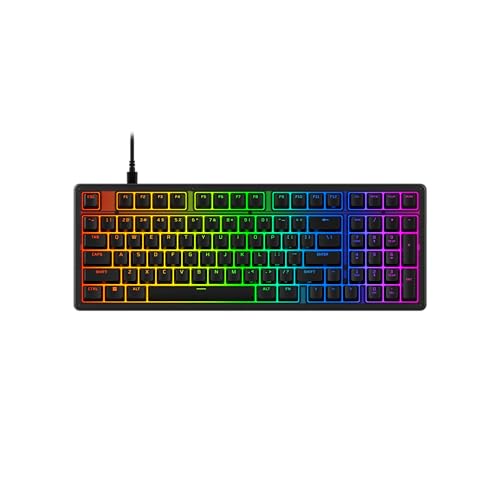
The best HyperX gaming keyboard for most players is the Alloy Origins Core: its compact tenkeyless layout saves desk space without giving up the function row or arrow keys. Choose the full-size Alloy Origins if you need a number pad, the smaller Alloy Origins 60 if mouse room is your priority, or an Alloy Rise model if you want a more customizable design. HyperX model names and availability can vary by region, so check the exact switch and layout listed for the version you’re buying.
Quick comparison
These figures describe commonly listed wired configurations; regional editions and revisions may differ. Weight can also vary slightly by layout and included keycaps.
Our top picks



As an Amazon Associate we earn from qualifying purchases at no extra cost to you. Ratings are shown as listed on Amazon.
| Keyboard | Layout | Approx. size | Approx. weight | Connection and useful distinction |
|---|---|---|---|---|
| Alloy Origins | Full-size, 100% | 442 × 132 × 36 mm | 1,075 g | Wired USB-C; number pad and three-position feet |
| Alloy Origins Core | Tenkeyless, 80% | 360 × 132 × 34 mm | 900 g | Wired USB-C; keeps arrows and function row |
| Alloy Origins 60 | 60% | 296 × 105 × 36 mm | 781 g | Wired USB-C; smallest desk footprint |
| Alloy Rise 75 | 75% | Approximately 330 × 140 mm | Varies by configuration | Wireless-capable configurations; more compact than full-size while retaining a function row |
Dimensions and weights are approximate and may depend on the specific regional model. The 60% layout omits dedicated arrow and function keys; those actions are accessed through key combinations. The Rise lineup has configurable versions, so verify whether a listing is wired or wireless and which parts are included.
Pick by your desk and playing habits
| Your situation | Best fit | Why | Trade-off |
|---|---|---|---|
| You play competitive games and want more mouse room | Alloy Origins Core | Tenkeyless size clears space on the right while keeping familiar navigation keys | No number pad |
| You use spreadsheets, shortcuts, or number entry often | Alloy Origins | Full-size layout avoids relying on layers for the number pad | Takes up more horizontal desk space |
| Your desk is very small or you travel with your keyboard | Alloy Origins 60 | Its roughly 296 mm width leaves the most room for a mouse | Arrow keys and function keys require shortcuts |
| You want a compact layout but use the function row daily | Alloy Rise 75 | A 75% layout preserves more dedicated keys than a 60% board | Check the exact connectivity and configuration before buying |
A useful fit check is to measure the clear space between your monitor stand and mouse area. If the keyboard leaves too little room for your usual mouse movement, step down from full-size to tenkeyless before considering 60%. A 60% board is compact, but its layers can slow down everyday tasks if you frequently use arrows, F-keys, or dedicated navigation controls.
Switches, latency, and RGB: what matters in practice
HyperX switch types
Many Alloy Origins configurations use HyperX mechanical switches in linear Red, tactile Aqua, or clicky Blue versions. Red switches move without a tactile bump or audible click, making them a common choice for fast repeated presses and quieter shared rooms. Aqua switches provide a bump you can feel without the pronounced click of Blue. Blue switches offer both a tactile bump and a clear click, but that sound can be distracting to people nearby.
Switch names alone do not establish that one keyboard is faster. The feel you prefer, actuation consistency, and your ability to avoid accidental presses matter more than choosing a switch based on color. Switch availability varies by model and region; confirm the exact option on the product listing. Some newer configurations use different or customizable switch arrangements, so don’t assume every HyperX board offers all three types.
Latency and connection
Wired Alloy Origins models avoid wireless battery and interference concerns, and their USB connection is appropriate for competitive play. HyperX advertises a polling rate of up to 1,000 Hz on many gaming keyboards, which means the keyboard can report input at intervals as short as 1 millisecond under supported settings. That is a reporting interval, not a guarantee that every key press reaches a game in exactly 1 ms; game processing, system load, and other parts of the input chain also affect perceived response.
Wireless models such as some Alloy Rise configurations are more convenient for a clean desk, but compare the exact connection modes and battery specifications for the particular version. If lowest-maintenance responsiveness is your priority, choose a wired model. For ordinary gaming and work, a reliable wireless connection can be a reasonable trade if cable-free placement matters more.
RGB control
Per-key RGB is useful for more than decoration: a restrained color map can mark movement keys, ability keys, or a second layer. HyperX NGENUITY software is used to configure lighting and, on supported models, profiles and other keyboard settings. Software features can differ across models and operating systems, so check compatibility if you rely on onboard profile storage or want to configure the board on a computer where you cannot install software.
For a low-distraction setup, set a static color or reduce brightness rather than running animated effects. If you move between computers, verify whether your preferred lighting and macros are saved to the keyboard or depend on the software running in the background.
Keycap durability and everyday ownership
Many Alloy Origins boards ship with double-shot PBT keycaps. PBT generally resists the glossy wear that can develop on frequently used ABS keycaps, and double-shot legends are formed from a separate plastic, helping the markings resist fading. This does not make keycaps indestructible: textured surfaces collect skin oils and dust, and the space bar can show wear or develop a different feel before less-used keys.
- Clean gently: unplug the keyboard, remove loose debris with a soft brush or air, and wipe the case with a lightly damp microfiber cloth. Avoid spraying liquid directly onto switches.
- Keep liquids away: a keyboard is not made spill-proof simply because its frame is metal. A spill can damage switches or electronics; disconnect power promptly and follow the manufacturer’s care guidance.
- Be careful with key removal: use a keycap puller and pull straight up. Twisting or levering against the case can damage stems or scratch the finish.
- Check replacement compatibility: replacement keycap sets must match the keyboard’s layout and switch stems. Compact boards may use nonstandard-sized modifiers, and some RGB effects look dimmer with opaque keycaps.
A metal frame can help a keyboard feel stable, but it does not prevent normal wear on keycaps, cable connectors, or switches. For a board used daily, the parts most likely to need attention are the keycaps and the cable—not necessarily the switches. A detachable USB-C cable is easier to replace than a permanently attached one, but cable shape and connector clearance still matter if you use a custom desk setup.
Final picks by setup
Choose the Alloy Origins Core for the best balance of familiar controls, desk space, and wired gaming. Get the Alloy Origins if the number pad is part of your work or play routine. Pick the Alloy Origins 60 only if you are comfortable using layers for arrows and function keys. Consider an Alloy Rise 75 when you want a compact layout with more dedicated keys and the specific version’s wireless or customization features suit your setup.
Before ordering, confirm three details on the exact regional listing: layout, switch type, and connection. Those differences can matter more to your daily experience than lighting effects or headline polling-rate figures.